
The Phone Setting Many Older Americans Wish They Changed Sooner
Spam calls and fake “account” texts are built to catch you off guard, especially on a small screen. Many older iPhone owners never explore basic iphone settings for seniors that can dramatically reduce these risks. One missed setting can mean more interruptions, more pressure, and more chances to get tricked.
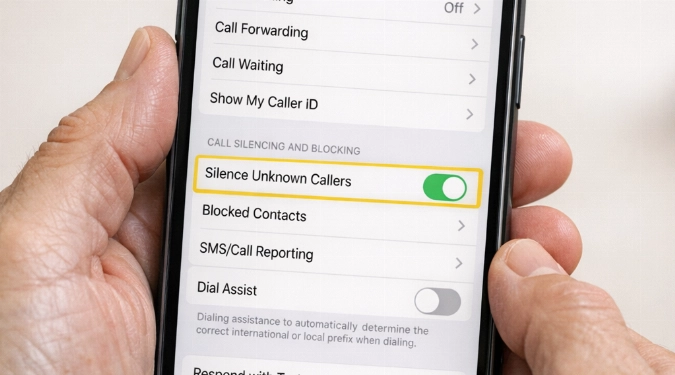
Turn on one iPhone setting that blocks most scam calls and fake texts before they reach you. This guide shows the exact toggles, what they do, and the tradeoffs. You will also learn a quick checklist to tighten smartphone security settings without making your phone hard to use at all.
The Setting Most People Miss
The setting is Silence Unknown Callers. It sends calls from numbers not in Contacts to voicemail. It still lets through calls you recently made. It also lets through numbers suggested by Siri.
Go to Settings, then Apps, then Phone. Tap Silence Unknown Callers. Turn it on.
This single toggle is one of the most effective tools for scam protection for seniors. It cuts down the live conversation scams that pressure people fast. It also reduces robocalls that ask you to “press 1.”
What You Give Up, And How To Fix It
You might miss a call from a doctor’s office, a pharmacy, or a delivery driver. You can handle that without turning the feature off.
- Add key numbers to Contacts. Save your clinic, pharmacy, bank, and building desk.
- Use Favorites for speed. Open Phone, tap Favorites, then add the people you call most.
- Let voicemail do the screening. Real callers leave a message. Scammers often do not.
- Turn on Live Voicemail. Go to Settings, Apps, Phone, Live Voicemail.
If you use an iPhone and still get spam, carriers also offer filters. Examples include AT&T ActiveArmor, Verizon Call Filter, and T-Mobile Scam Shield. Some plans bundle them. Others charge about $0 to $4 per month.
Pair It With Two High-Impact Toggles
The best smartphone security settings work in layers. These two take under five minutes.
Block Unknown Text Senders
Go to Settings, then Apps, then Messages. Turn on Filter Unknown Senders. Unknown texts go into a separate list. You still receive them, but they are easier to ignore.
This helps with package scams and “bank alert” texts. It also reduces accidental taps on sketchy links.
Lock Down Callbacks And Codes
Open Settings and tap your name. Tap Sign-In & Security. Turn on Two-Factor Authentication if it is off.
Then go to Settings, Apps, Messages. Tap Message Forwarding. Disable any device you do not recognize.
A Fast “Anti-Scam” Checklist
These are hidden iPhone features that reduce risk without changing how you call family.
- Face ID attention: Settings, Face ID & Passcode, turn on Attention Aware Features.
- Safety Check: Settings, Privacy & Security, Safety Check, review sharing and access.
- App permissions: Settings, Privacy & Security, check Contacts, Photos, and Microphone.
- Auto-delete codes: Settings, Apps, Passwords, turn on Clean Up Automatically.
If you want one more safeguard, set a stronger passcode. Use Settings, Face ID & Passcode, Change Passcode. Avoid birthdays and simple patterns.
How To Explain The Change To Family
Tell people you turned on a call screener. Ask them to save your number and text first. Ask them to leave a voicemail if they call from a new phone.
If you help a parent set this up, add their most important contacts. Add doctors, caregivers, and close friends. This is one of the most practical senior smartphone tips because it prevents confusion later.
FAQs
Will Emergency Calls Still Ring?
Yes. Calls from emergency services are not affected. Calls from people in your Contacts will ring normally.
What If A Legit Caller Uses A Blocked Caller ID?
They will usually be silenced. Ask organizations to call from a main line you can save. For one-off situations, turn the toggle off temporarily.
Is There A Similar Setting On Android?
Most Android phones have spam filtering in the Phone app. Pixel uses Google Phone spam protection. Samsung uses Smart Call in many regions. You can also use Hiya or Truecaller for additional screening.
Disclaimer: The information provided in this article is for educational and informational purposes only. It does not constitute professional advice. Readers should conduct their own research and consult with qualified professionals before making any decisions.