
Seniors Surprised by Small Device’s Helpful Benefits
Some of the most meaningful improvements in senior safety and comfort come from small, easy-to-use devices. This article explains how a wearable emergency help button like Life Alert can speed up getting assistance, how OrCam MyEye reads text aloud from eyeglasses to support low-vision independence, and how ElliQ and GrandPad can reduce isolation through simple conversations and video calls. It also covers practical home add-ons like motion-sensor night lights, video doorbells, and smart thermostats, plus what to check before choosing a device for day-to-day needs.
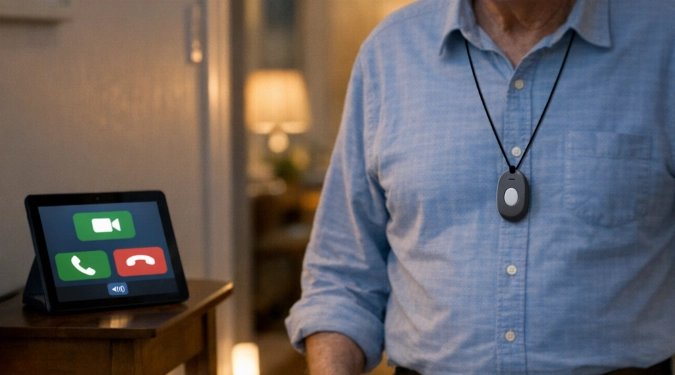
It’s often the smallest gadget that changes the day-to-day the most. Many older adults are surprised by how a wearable help button, a clip-on reader for glasses, or even a motion light can quietly remove stress from routines and make home feel safer. Here are a few standout devices and the specific, practical benefits people notice fast.
The Small Device That Brings Fast Help Within Reach
A personal emergency response system such as Life Alert is a classic example of help for seniors that stays simple: a base unit plus a small wireless button worn as a pendant or wristband. If someone falls, feels unwell, or can’t reach a phone, pressing the button connects them to a response center that can help contact emergency services and listed caregivers.
Many families describe the button as an easy safety tool because it fits into daily life without a learning curve. It also helps some older adults stay independent longer, because they can keep doing normal activities at home while knowing backup is close at hand.
A Clip-On Reader That Gives Back Everyday Independence
For seniors with low vision, OrCam MyEye is a small, portable artificial-vision device that attaches to eyeglass frames and reads printed text out loud. It can also help identify products (including many barcodes) and recognize faces, which can reduce awkward moments and increase confidence in public and at home.
Studies and user reports commonly highlight task-based improvements, such as reading mail, menus, signs, and messages on screens. For many, this feels like a simple safety aid too, because being able to hear medication labels or instructions can reduce mistakes. If you want to see how it works before committing, look for official demos and accessibility organizations that offer hands-on trials or guided training.
An AI Companion That Helps Seniors Feel Less Alone
ElliQ, by Intuition Robotics, is an AI-powered companion designed for older adults. It’s intentionally not human-like, using a friendly, lamp-like form that makes it clear it’s a device. ElliQ can chat, suggest activities, offer reminders, and help place video calls, which can be especially valuable for people who are homebound or living alone.
In real deployments, more than 900 units have been distributed across multiple states, with notable rollouts including Florida, New York, and Washington. Users often say the conversations and daily check-ins help them get peace of mind during quiet hours. It’s not a replacement for people, but it can be a meaningful “in-between” layer of connection that makes loneliness easier to manage.
A Tablet Built For Seniors Who Want Communication Without Friction
GrandPad is a senior-friendly tablet with a simplified interface for video calls, photos, messages, and news. The goal is to remove common barriers like tiny icons, confusing settings, and accidental taps. For families, it can also reduce tech-support calls because the experience is more guided and consistent.
If you’re helping a parent discover the device that fits their comfort level, consider what they’ll do most: video chat, share photos, or send messages. The best choice is the one they’ll actually use, even if it has fewer features on paper.
Small Home Devices That Prevent Common Problems
Not every senior life saver is high-tech. A few small add-ons can reduce risk in the places falls and mishaps happen most, especially at night and near entryways.
- Motion-sensor night lights: These lights turn on when movement is detected and can illuminate the path to the bathroom without hunting for a switch.
- Video doorbells (such as Ring or Nest Hello): Two-way audio and a live view can help someone decide whether to open the door, even if they move slowly.
- Smart thermostats (such as Nest or ecobee): Adjusting temperature from a phone or with a simple schedule can reduce the need to get up frequently.
How To Choose The Right Small Device For Your Situation
Before you try it now, match the device to a specific daily pain point: falls risk, low vision, isolation, or reaching and bending. For example, a ZAYAD Reacher Grabber Tool can reduce strain by retrieving items from shelves or the floor, while TV headphones from TV Ears, Sennheiser, or Sony can make dialogue clearer without blasting the volume.
Also check practical details that affect usability: battery life, whether it requires Wi‑Fi or cellular service, if it works during power outages, and whether caregivers can be added as contacts. If you’re comparing fall-response options, a device like the CPR Guardian Fall Detection Watch may add features such as SOS calling, location sharing, and safety zones through an app.
Frequently Asked Questions
Is A Wearable Help Button Hard To Use?
Typically no. Most systems are designed around a single press and a live operator. The key is wearing it consistently and testing it as recommended by the provider.
Do These Devices Replace Caregivers Or Family Check-Ins?
No. They can add support between visits by making communication easier, providing reminders, or enabling faster response in an emergency.
What If A Senior Doesn’t Like “Complicated Tech”?
Start with one clear benefit and a low-effort setup, like motion-sensor night lights or a simplified tablet. Confidence tends to build after a few easy wins.
How Do You Decide Which Device To Get First?
Begin with the highest-impact risk or frustration. If falls are the main concern, prioritize an alert button or watch. If reading is the barrier, start with a wearable reader. If loneliness is the hardest part, consider an AI companion or an easy video-calling device. When you’re ready to take the next step, you can review plans and options and, if it fits your needs, order yours today through the manufacturer or a trusted retailer.
Conclusion
Seniors are often surprised that a small device can deliver such helpful benefits: faster emergency response, easier reading, more connection, and a safer home routine. The best results usually come from choosing one tool that targets one daily challenge, then building from there as needs change.
Disclaimer: The information provided in this article is for educational and informational purposes only. It does not constitute professional advice. Readers should conduct their own research and consult with qualified professionals before making any decisions.