Easy‑To‑Use Phones And Must Have Features for Seniors
Shopping for a phone for an older adult can feel risky. The wrong choice means missed calls, confusing screens, and wasted money on features they will never use. This article is for families and seniors who want a phone that is easy on eyes, ears, and hands.
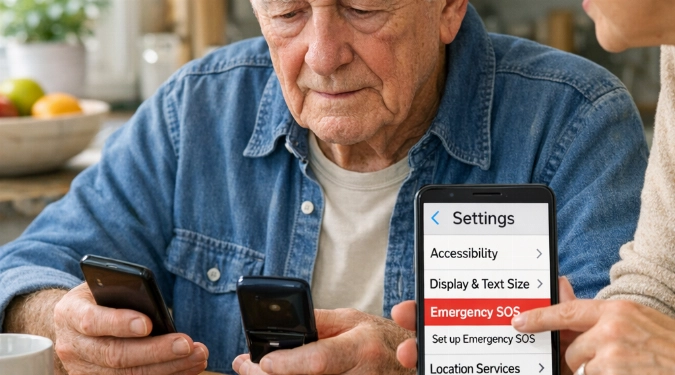
Pick a senior-friendly phone without guessing. This guide shows the exact features to check in a store or online listing. You’ll get a short list of reliable models, plus a simple way to compare price, screen, sound, and safety tools.
Start With Three Real-World Questions
- Will it be used mainly for calls and texts, or also photos, maps, and video visits?
- Is hearing, vision, or dexterity the main challenge?
- Does it need to work with a caregiver, like sharing location or emergency alerts?
Must-Have Phone Features That Matter Daily
Readable Screen And Simple Controls
- Look for a bright screen and strong contrast.
- Check for large text options and easy zoom.
- Prefer a clear home screen with fewer icons.
- Test the side buttons for volume and power feel.
Clear Audio And Hearing Support
- Prioritize loud maximum volume and clean speaker sound.
- Check for hearing aid compatibility, often labeled HAC M3/T3 or higher.
- Try Wi‑Fi calling if indoor reception is weak.
- Use a speakerphone that stays loud without distortion.
Emergency Tools That Are Actually Useful
- Look for SOS calling and emergency contact setup.
- Check for Medical ID info on the lock screen.
- Confirm location sharing works with family phones.
- Prefer fall detection only if the wearer will keep the phone on-body.
Six Phones Worth Comparing
- Jitterbug Smart4: Simplified menus and strong support lines. It is built around calls, messages, and help features.
- Lively Jitterbug Flip2: A flip option with big buttons and a clear external display. It suits call-first users.
- iPhone SE: Small size with long software support. It has strong accessibility tools and reliable performance.
- iPhone 15: Bigger, brighter screen and excellent hearing features. It pairs well with caregiver location sharing.
- Samsung Galaxy A15: Large display for the money and simple mode options. It works well for basic smartphone use.
- Google Pixel 8a: Clean interface and helpful call-screening tools. It is a strong choice for spam call control.
A Fast In-Store Test You Can Do In 10 Minutes
- Open settings and increase text size. Check if menus stay readable.
- Call a friend and test speakerphone. Ask if your voice sounds clear.
- Find the emergency settings. Add one contact and verify the shortcut works.
- Take a photo and view it. Confirm the gallery is easy to find again.
- Lock the phone and unlock it twice. Fingerprint or face unlock should work without struggle.
Simple Smartphone Comparisons That Prevent Regret
| What To Compare | What To Look For |
|---|---|
| Updates | Multiple years of security updates, so apps and banking stay compatible. |
| Battery | A full day with heavy calling, plus easy-to-press charging port or wireless charging. |
| Spam Protection | Caller ID tools and call blocking that are simple to manage. |
| Durability | A grippy case and a screen protector that does not reduce touch accuracy. |
What You’ll Really Pay
The cost of senior-friendly phones often breaks into three bands. Basic flip phones usually land around $60 to $130. Budget smartphones tend to run $150 to $300. Newer premium models often sit between $500 and $900.
Plans And Setup Choices That Make Life Easier
Before you choose cell phone plans for seniors, confirm coverage where the phone is used most. Ask about autopay discounts and data limits. If the user mostly calls, a low-data plan can be enough. If they video chat, plan for higher data.
Buying Checklist For Caregivers
- Set up emergency contacts and lock screen Medical ID.
- Turn on spam call filtering and block unknown callers if needed.
- Pin key apps to the home screen and remove the rest.
- Add a case with a lanyard or ring grip for steadier handling.
FAQs
What Are The Best Phones For Hearing Impaired Users?
Best phones for hearing impaired shoppers should check HAC ratings, loud speaker clarity, and Bluetooth hearing device support. Also test captioned calls and live transcription features.
How Do I Find Trustworthy Cell Phone Reviews For Elderly Shoppers?
Use cell phone reviews for elderly that test speaker volume, text scaling, and emergency setup. Skip reviews that only rate cameras and gaming performance.
How Can I Buy Cell Phone For Elderly Parents Without Overbuying?
To buy cell phone for elderly parents wisely, match the phone to one primary goal. Then spend on comfort items like a case, charger, and setup help.
Which Models Often Rank As Top Smartphones For Elderly Users?
Top smartphones for elderly lists often include iPhone models, Samsung A-series phones, and Pixel A-series phones. The best pick depends on screen needs and spam control tools.
What Counts As Affordable Phones For Seniors Right Now?
Affordable phones for seniors usually cost under $300 and still get current security updates. Focus on brightness, loudness, and simplicity over extra cameras.
What Features Should I Prioritize First?
Cell phone features for seniors should start with readability, loud clean audio, and easy emergency access. After that, prioritize battery life and spam blocking.
What Are The Best Cell Phones For Seniors Who Only Want Basics?
Best cell phones for seniors who want basics are often flip phones or simplified smartphones. Choose based on button comfort and how often texting is needed.
References
- Federal Communications Commission (FCC): Hearing Aid Compatibility information
- Apple Support: Accessibility features (text size, hearing, emergency SOS)
- Google Safety Center: Personal safety features
Disclaimer: The information provided in this article is for educational and informational purposes only. It does not constitute professional advice. Readers should conduct their own research and consult with qualified professionals before making any decisions.